Put a Sprite on Screen
What you are about to achieve
Replace the moving box with a real sprite and understand the smallest useful version of the asset pipeline.
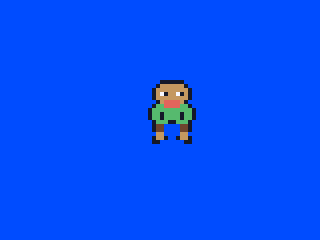
Expected result
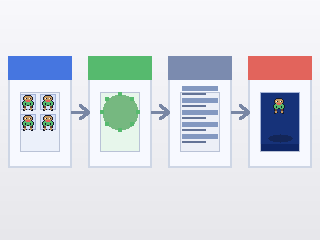
How the asset flows
Stay in examples/clearscreen/. In this step you will keep editing examples/clearscreen/main.go, add examples/clearscreen/assets_embed.go, and run the asset-generation command from inside examples/clearscreen/.
Minimal files
In examples/clearscreen/main.go, replace the moving box version with:
type Game struct {
	x    float32
	hero *gosprite64.SpriteSheet
}

func (g *Game) Init() {
	g.x = 144

	hero, err := gosprite64.LoadSpriteSheet("assets/hero.sheet")
	if err != nil {
		panic(err)
	}
	g.hero = hero
}

func (g *Game) Update() {
	g.x += 1
	if g.x > 287 {
		g.x = -16
	}
}

func (g *Game) Draw() {
	gosprite64.ClearScreenWith(gosprite64.Blue)
	gosprite64.DrawSprite(g.hero, 0, g.x, 80)
}
Add examples/clearscreen/assets_embed.go so the ROM can load files from examples/clearscreen/assets/:
package main

import (
	"embed"

	"github.com/clktmr/n64/drivers/cartfs"
	"github.com/drpaneas/gosprite64"
)

//go:embed assets/*
var assetsFS embed.FS

var assetFS = cartfs.Embed(assetsFS)

func init() {
	gosprite64.RegisterAssetFS(assetFS)
}
Then put a 64x16 PNG strip at examples/clearscreen/assets-src/character.png. If you are following along inside this repository, a good checked-in example is examples/platformer/assets-src/character.png.
From inside examples/clearscreen/, run:
mkdir -p assets assets-src
go run ../../cmd/mk2dsheet \
  -in assets-src/character.png \
  -out assets/hero.sheet \
  -tile-width 16 -tile-height 16
That command writes examples/clearscreen/assets/hero.sheet, which assets_embed.go registers and main.go loads once in Init().
If you are currently in the repository root, run cd examples/clearscreen first, then use the command above.
When the asset file is ready, go back to the repository root and rebuild the ROM:
cd ../..
./build_examples.sh
Then reopen examples/clearscreen/game.z64.
What changed
You stopped drawing a placeholder rectangle and started drawing image-based content loaded once during setup, with a clean screen each frame before the sprite is drawn. The sprite also wraps back to the left so it stays visible instead of drifting away forever.
Why it matters
This is the point where the project starts to feel like a game instead of a rendering demo.
If this failed
Double-check that assets-src/character.png exists before you run mk2dsheet, make sure assets/hero.sheet was created inside examples/clearscreen/assets/, confirm that assets_embed.go uses cartfs.Embed(...) before gosprite64.RegisterAssetFS(...), and make sure the wrap check stays inside Update() so the sprite remains visible.
Need the full sprite-sheet pipeline and more examples? Go to Sprites.
Next step
Go to Build a Tiny Playable Scene.